
The Invisible Guard: How DMZs Protect the Modern Enterprise

Laziryl
Feb 25, 2026
Table of contents
What is DMZ?
The Concept: The Office Lobby Analogy
How It Works (The Architecture)
Real-World Simulation
The Topology
The Default ASA’s Rules
The Configuration
Testing
Conclusion
Tags:
What is DMZ?
DMZ (Demilitarized Zone) is a physical or logical subnetwork that acts as a buffer between an organization's secure internal network and the untrusted, public internet. The name is borrowed from military history. It is a neutral "no man's land" where you place resources that need to be accessed by outsiders (like customers) but shouldn't have full access to your "home base" (your internal files).
The Concept: The Office Lobby Analogy
To understand a DMZ, think of a high-security office building :
The Internet: The public street outside.
The Internal Network (LAN): The secure offices upstairs where sensitive files and employee computers are kept.
The DMZ: The Lobby.
The lobby is open to the public. Anyone can walk in to talk to the receptionist (Web Server) or drop off a package (Email Server). However, just because you are in the lobby doesn't mean you can take the elevator straight to the CEO's office. You are restricted to that middle zone.
How It Works (The Architecture)
A DMZ is usually set up using one of two methods :
1. Single Firewall (Three-Legged)
One firewall with three "legs" or ports:
One goes to the Internet
One goes to the DMZ servers
One goes to the internal LAN
2. Dual Firewall (The Gold Standard)
a. External Firewall
Sits between the Internet and the DMZ. It only allows traffic destined for public services (like Port 80 for web).
b. Internal Firewall
Sits between the DMZ and the LAN. It only allows the DMZ servers to talk to the internal database they need.
Real-World Simulation
Imagine you run an e-commerce site. You have a Web Server that customers visit and a Database containing customer credit card info. Let's look at what happens when things go wrong.
A hacker finds a vulnerability in the Web Server (in the DMZ). They successfully gain remote control of that server. The hacker wants to steal the entire Credit Card Database sitting in the Internal LAN.
The hacker tries to use the compromised Web Server to "scan" the internal network for the database.
The hacker sends a probe from DMZ to LAN.
The Firewall checks its rulebook: "Is the DMZ allowed to scan the LAN? No. Is the DMZ allowed to use File Sharing (SMB) to the LAN? No."
Firewall drops the packets. Even though the Web Server is "conquered," the hacker is stuck in that "lobby" (the DMZ). They cannot reach the employee's PC or the internal server because the firewall's acts as a locked door that only opens for very specific, pre-approved types of data.
We’ll use Cisco ASA (Adaptive Security Appliance) in Packet Tracer to simulate this with single firewall configuration.
The Topology
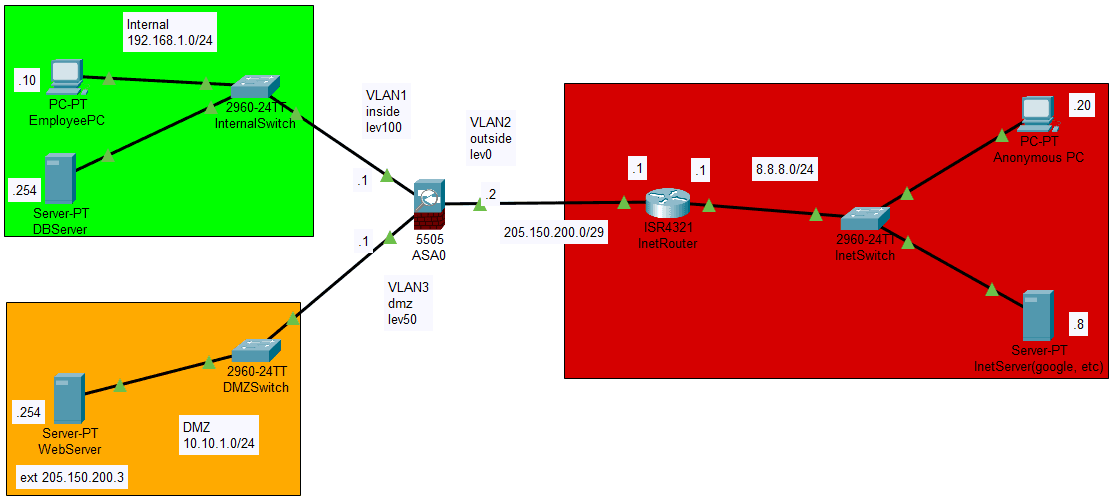
This is the topology of single firewall DMZ infrastructure. Green zone is the company’s internal network. Orange zone is the DMZ. And red zone is the public network (internet).
Here’s the IP configuration :
192.168.1.0/24 for internal with security level 100
10.10.1.0/24 for DMZ with security level 50
205.150.200.0/29 for outside with security level 0
8.8.8.0/24 for public
The Default ASA’s Rules
Security Level Traffic Policy :
Traffic going from a lower security interface is denied when going to a higher security interface
Traffic going from a higher security interface is allowed when going to a lower security interface
Without adding any ACLs at all to the configuration, the following traffic in this example works :
Hosts on the inside (security level 100) can connect to hosts on the dmz (security level 50)
Hosts on the inside (security level 100) can connect to hosts on the outside (security level 0)
Hosts on the dmz (security level 50) can connect to hosts on the outside (security level 0)
However, the following traffic is denied :
Hosts on the outside (security level 0) cannot connect to hosts on the inside (security level 100)
Hosts on the outside (security level 0) cannot connect to hosts on the dmz (security level 50)
Hosts on the dmz (security level 50) cannot connect to hosts on the inside (security level 100)
We need to configure ACL so that outside zone can access DMZ zone, and DMZ zone can access DB Server located in internal zone.
The Configuration

First thing to configure is the IP address of each interface. Let’s assign the IP to vlan and assign those vlan to each interface.
interface Vlan1
nameif inside
security-level 100
ip address 192.168.1.1 255.255.255.0
!
interface Vlan2
no forward interface Vlan1
nameif outside
security-level 0
ip address 205.150.200.2 255.255.255.248
!
interface Vlan3
nameif dmz
security-level 50
ip address 10.10.1.1 255.255.255.0
!
interface Ethernet0/0
switchport access vlan 2
!
interface Ethernet0/1
switchport access vlan 1
!
interface Ethernet0/2
switchport access vlan 3
!
route outside 0.0.0.0 0.0.0.0 205.150.200.1 1
The next thing to configure is the NAT rules that allow the hosts on the inside and dmz segments to connect to the Internet. Because these hosts are using private IP addresses, we need to translate them to something that is routable on the Internet. In this case translate the address so that they look like the ASA's outside interface IP address.
In order to configure this NAT, we need to create a network object that represents the inside subnet as well as one that represents the dmz subnet.
object network inside-LAN
subnet 192.168.1.0 255.255.255.0
nat (inside,outside) dynamic interface
!
object network server-DMZ
host 10.10.1.254
nat (dmz,outside) static 205.150.200.3
!
The DMZ server have an external IP, which is 205.150.200.3. Now we need to configure ACL so that outside zone can access DMZ zone
Here’s the commands :
access-list server_DMZ_ACL extended permit ip any object server-DMZ
access-group server_DMZ_ACL in interface outside
Next, let’s configure so that DMZ server can talk to DB Server on the internal network. We need to create an object for it.
object network internal-server
host 192.168.1.254

access-list dmztoinside extended permit ip any object internal-server
access-list dmztoinside extended deny ip any object inside-LAN
access-list dmztoinside extended permit ip any any

access-group dmztoinside in interface dmz
The ACL is more complex than simply allowing that traffic to the DB. If all we did is that first 'permit' line, then all traffic would be blocked from the dmz to hosts on the internet. Access-list have an implicit 'deny ip any any' at the end of the ACL. As a result, your dmz hosts would not be able to go out to the internet. Even though traffic from the dmz to the outside is permitted by default, by applying an ACL to the dmz interface, those default security behaviors for the dmz interface are no longer in effect and we must explicitly permit the traffic in the interface ACL.
In this configuration, we use “permit any” instead of specific rules because there is no other specific service such as sql in packet tracer.
Great, all ACL and NAT configurations is done. By default, ASA is rejecting all ICMP traffic. Now we need to make some changes so we can test our configuration with ping.
class inspection_default
inspect http
inspect icmp
!
class-map inspection_default
match default-inspection-traffic
!
policy-map global_policy
!
service-policy global_policy global
All configurations is done. Let’s test it with real time simulations.
Testing
First scenario is when the employee wants to access internet with their PC that located in inside zone. Let’s open the web browser and access inet server(8.8.8.8).
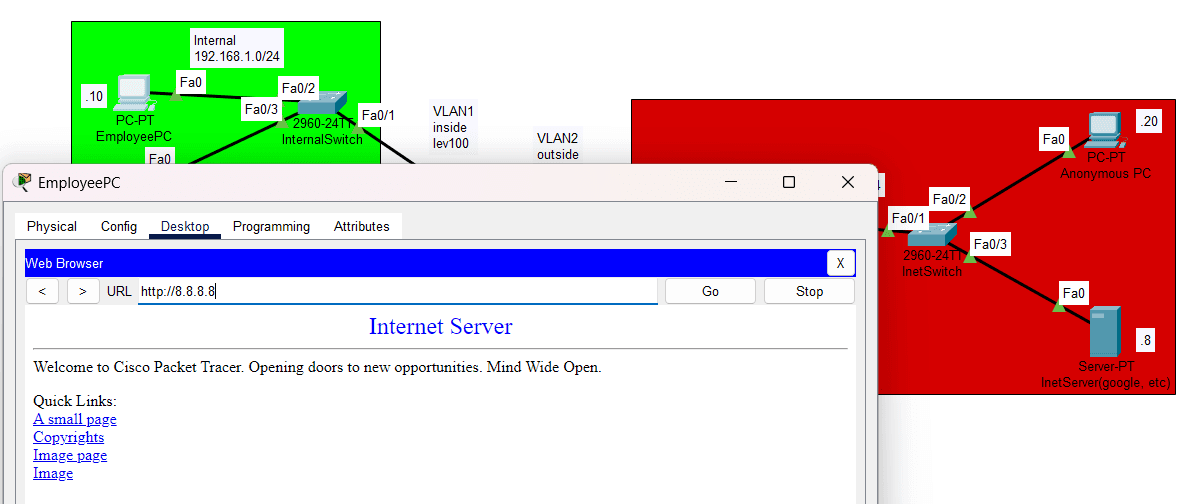
The connection established successfully.
The second scenario is when anonymous customer wants to access the company web server, located in DMZ zone (205.150.200.3)
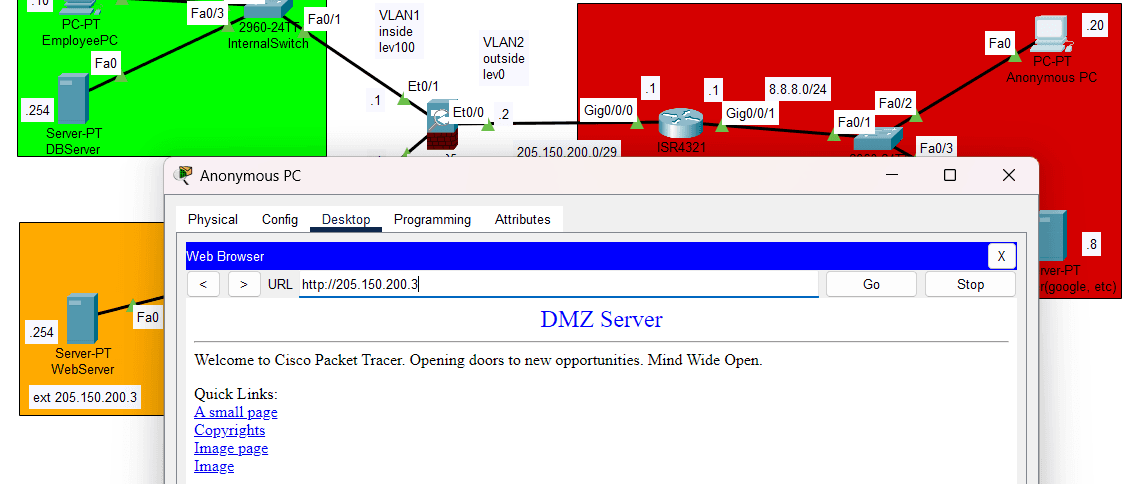
The connection established successfully.
Third scenario, is when anonymous people try to access company’s internal network DB server(192.168.1.254)
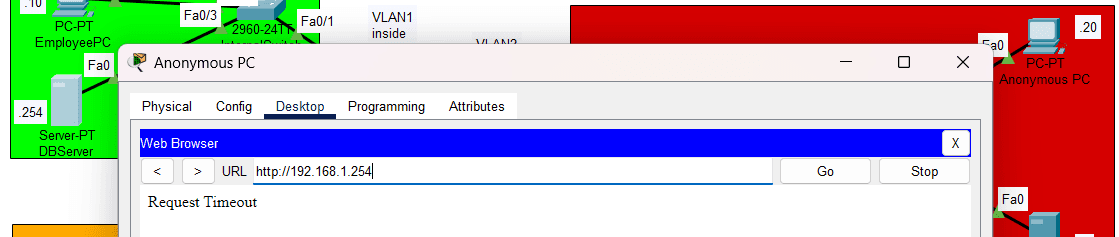
The connection is not established
Fourth scenario is when DMZ server want to access DB server(192.168.1.254)
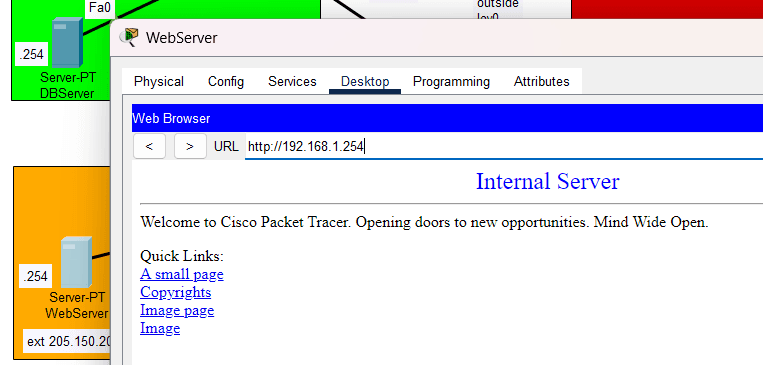
The connection established successfully.
Last scenario is when DMZ server want to access employee’s pc(192.168.1.10)
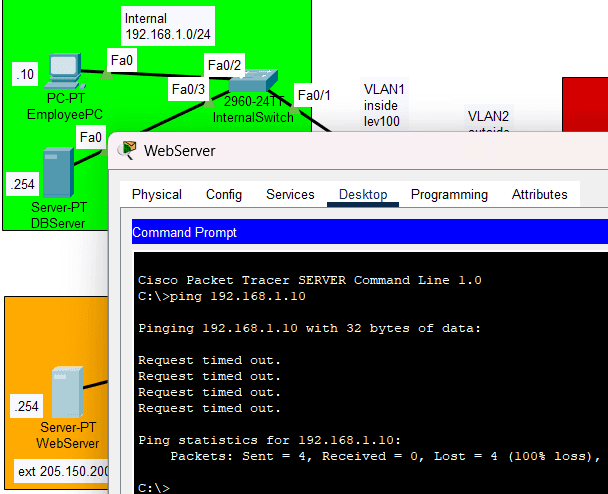
The connection is not established
Conclusion
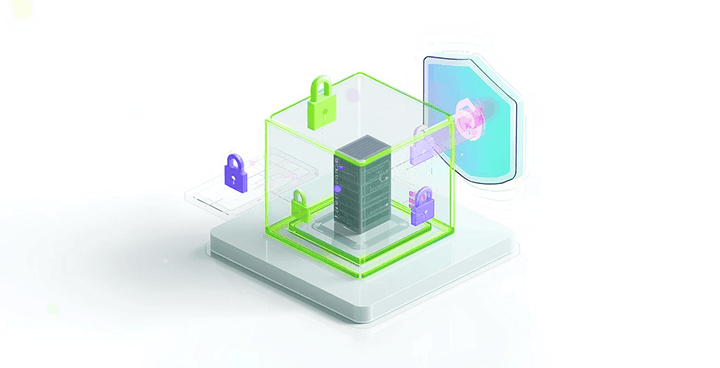
In short, a DMZ is your network's security checkpoint. It is a strategic "middle ground" designed to expose public-facing services while keeping your private data locked behind a second door.
A DMZ doesn't make a server "invincible," but it ensures that if a server is compromised, the damage is contained. It is the digital equivalent of a "buffer zone," balancing the need for public accessibility with the necessity of private security.
From time to time, cyber threats is evolving. So do the defending mechanisms. Now DMZ is mixed with zero trust access. Also known as “modern DMZ”
Continue Reading
Alert Fatigue: The Silent Threat That Turns Critical Warnings into Background Noise
In the world of cybersecurity, alerts are meant to be the first line of defense against potential threats. However, the sheer volume of alerts that security teams receive can lead to a phenomenon known as alert fatigue, where analysts become desensitized to warnings and may miss genuine threats.
Read More
Security Awareness Training: Building a Culture of Cyber Resilience
Employees are often the weakest link in an organization's security system because they may forget important information and are vulnerable to fraud. Security awareness training helps employees understand the risks, threats, and vulnerabilities that can be targeted. This training teaches them how to protect the organization's network and data, especially for organizations operating in the IT sector, where employees who use devices are often the target of cyber attacks.
Read More

State of the Art: Architecture, Training, and Engineering of Large Language Models
The foundational pillar of modern Large Language Models (LLMs) rests upon the Transformer architecture, a computational paradigm that fundamentally altered natural language processing through the Self-Attention mechanism. Unlike recurrent networks that process data sequentially, Self-Attention allows every token within an input sequence to interact with all other tokens simultaneously. This generates a highly contextualized representation space capable of capturing long-range dependencies without rigid structural boundaries.
Read More
The Invisible Guard: How DMZs Protect the Modern Enterprise
Digitalization in the healthcare sector has been growing rapidly alongside the increasing adoption of information technology in healthcare services. The implementation of electronic medical records, online doctor consultation applications, and hospital queue management systems has significantly transformed healthcare delivery, making services more efficient and accessible for patients. However, this digital transformation also introduces new risks, particularly the rising threat to information security. This situation poses a serious challenge for the healthcare sector in the digital era, requiring organizations to establish, implement, and continuously improve information security management systems in a sustainable manner (Ansar, 2024).
Read More

ISO/IEC 27001: A Strategic Investment in Healthcare Security in the Digital Era
Digitalization in the healthcare sector has been growing rapidly alongside the increasing adoption of information technology in healthcare services. The implementation of electronic medical records, online doctor consultation applications, and hospital queue management systems has significantly transformed healthcare delivery, making services more efficient and accessible for patients. However, this digital transformation also introduces new risks, particularly the rising threat to information security. This situation poses a serious challenge for the healthcare sector in the digital era, requiring organizations to establish, implement, and continuously improve information security management systems in a sustainable manner (Ansar, 2024).
Read More
Large Language Model Vulnerabilities
With the integration of Large Language Models (LLMs) being commonplace in the workflows of enterprises across the globe, it is imperative that their vulnerabilities be known. Although developers use “System Prompts” to set behavioral guidelines for these models to safeguard confidential information, these directions are not foolproof.
Read More


© 2025 Tjakrabirawa Teknologi Indonesia. All Rights Reserved.